
Is Terabox Safe? That’s the question many users are asking before trusting a platform with their personal files. Today, we store everything—from photos to important documents—on cloud services, making security more important than ever.
Terabox is a platform that provides users with 1TB of free storage. Because of this, many people are interested in using it. But before using it, not just you but many users have a common question—Is Terabox really safe?
In this article, we discuss Terabox’s security, potential risks, and alternative solutions in detailed way, so that you can decide for yourself.
So, is it really safe in 2026, or a risky choice? Let’s find out.
Is Terabox Safe?
Before that, you need to know what Terabox is!
Terabox is a cloud storage service where users can upload and share their files. It is especially popular because it offers up to about 1TB storage for free, which can later be increased by paying money.
This service is operated by Flextech Co., Ltd., and its goal is to provide users with an easy and affordable storage solution.
Users generally use Terabox for:
- Storing large video files
- Sharing files
- Keeping backups
However, since it is a free service, it also has some limitations and questions like is Terabox Safe?
Terabox claims that they use various security technologies, such as encryption, to protect user data. This means your files cannot be easily viewed directly by others.
However, the reality is that no free service is completely privacy-focused. Sometimes some data gets leaked for service improvement and advertising.
So it can be said, it is okay for normal files, but not completely safe for personal or sensitive data.
Is Terabox Safe? Analyzing App Permissions
When using the Terabox app, it may ask for various permissions on your device, such as:
- Camera
- Gallery
- Contacts
- Microphone
- Music & Audio
- Full File Access (All Files)
- Also asks for auto backup photo & video (Risky)
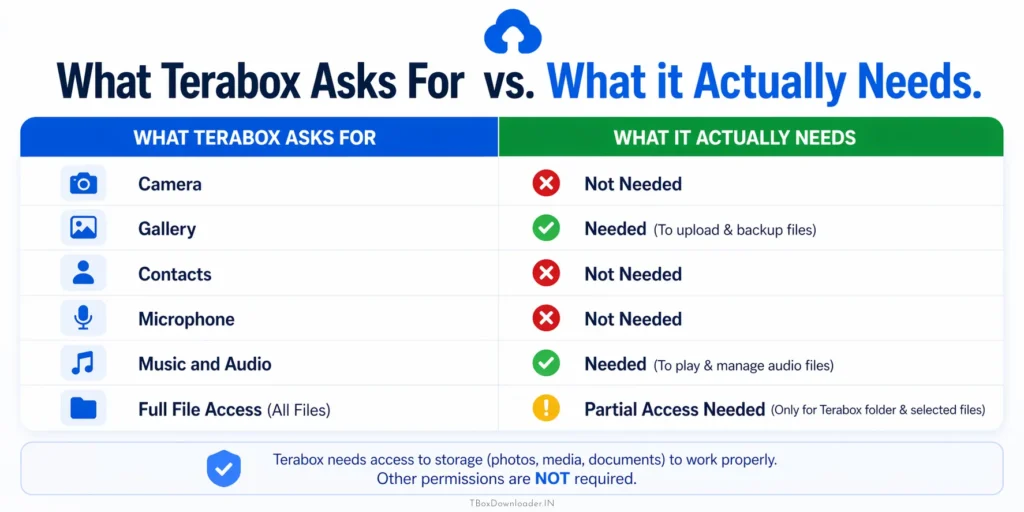
Some permissions are common and few are suspicious, so many users may feel uncomfortable—especially those who are conscious about privacy.
Instead of the mobile app, access TeraBox through a web browser. This helps you avoid unnecessary permissions that apps often request. If you’re unsure how to navigate this, see our complete guide on how to download Terabox link videos without the app.
Terabox Server Security: Is it Safe for Your Data?
Terabox uses cloud servers, which are generally secure. However, users do not know where and how their data is stored—this is also an important issue.
Potential Security Risks: Is Terabox Safe for Personal Files?
Using Terabox involves risks like data privacy concerns, slow speeds, intrusive ads, forced app installs, malware from unofficial links, and possible account security issues, requiring users to stay cautious and aware.
When evaluating is Terabox safe for personal files, the biggest concern isn’t just the encryption, but the intrusive nature of the ads.
While these throttled speeds are frustrating, you can significantly improve your experience by learning how to download Terabox videos faster using specific speed boost techniques.
Privacy Concerns: Do Ads Make Terabox Less Safe?
The biggest problem of Terabox is its advertisements. Since it is a free service, it depends on ads for income.
Users often see:
- Frequent popups
- Video ads
- Redirect pages
These are not only annoying, but sometimes can also be misleading.
Are Redirects a Reason Why Terabox Isn’t Fully Safe?
Many times, when opening a Terabox link, instead of directly showing the file, it redirects through multiple pages. This:
- Wastes time
- Increases the risk of clicking wrong links
- Creates a bad user experience
Is Terabox Safe from Data Tracking and Leaks?
As a free platform, Terabox may track some user activities, such as:
- Which file you are opening
- How long you are using
- Which link you are clicking
These are common, but for privacy-conscious users, it can be a big concern.
Third-Party Risks
While using Terabox share links, sometimes it may take users to third-party pages. If the user is not careful, then:
- They may enter wrong websites
- They may click phishing or scam links
This can bring a big danger if such scam links are clicked.
How to Use TeraBox Safely
If you still want to use TeraBox, following a few simple precautions can significantly reduce potential risks and help keep your data safer while using the platform.
1. Use a Browser
Instead of the mobile app, access TeraBox through a web browser.
This helps you avoid unnecessary permissions that apps often request.
2. Avoid Uploading Sensitive Files
Do not upload personal documents, passwords, or confidential data.
Keeping sensitive information offline reduces security risks.
3. Stay Away from Ads
Avoid clicking on popups or suspicious advertisements.
These can lead to unsafe websites or unwanted downloads.
4. Use a Separate Email
Create a different email account just for TeraBox.
This keeps your primary email safe from spam or potential breaches.
5. Verify Links Before Opening
Always double-check links before clicking.
Make sure they are correct, trusted, and not modified.
A More Secure Way: Is There a Safe Terabox Alternative?
If you are still wondering is Terabox safe to use as an app, many users prefer using browser-based tools like TBoxDownloader.IN to avoid giving the official app deep permissions into their phone’s storage.
Many users’ main purpose is to watch videos and download files from Terabox. But using Terabox directly often brings ads, login, and redirect problems.
In this case, an easy and safe alternative is using browser-based tools.
Is TBoxDownloader a Safe Terabox Tool?
You can easily watch or download Terabox videos and files safely using the TBoxDownloader.IN, avoiding ads, login issues, and unnecessary redirects for a smoother experience.
1. Strong Data Privacy
Your data remains secure, as the process avoids unnecessary access or storage of personal information.
2. No Login Required
There’s no need to create an account or sign in, saving time and reducing privacy risks. Your data remains secure, as the process avoids unnecessary access or storage of personal information.
For a step-by-step walkthrough of this process, check out our 2026 guide on downloading Terabox videos without login.
3. Paste Link for Instant Access
Simply open TBoxDownloader.IN, paste the Terabox link and click download to get immediate access without complicated steps.
4. Watch 4K Videos Smoothly
Enjoy high-quality 4K streaming with a smooth and uninterrupted viewing experience.
5. No VPN and No Ads
Access content directly without using a VPN, and avoid annoying ads for a cleaner experience.
Using this type of method allows users to Watch or download files quickly with less hassle and also reduces security risks.
Google Drive and Google Photos: A Secure Alternative to TeraBox
If you are concerned about privacy and security while using TeraBox, then switching to trusted platforms like Google Drive and Google Photos is a good decision.
Why Google Drive is Often Safer Than Terabox
The main reason users ask is Terabox safe is because of the massive 1TB of free storage. However, compared to Google Drive, the security protocols in Terabox are much less transparent.
These services are created by Google, and they follow strict security standards:
- Advanced Encryption : Your files are protected using strong encryption during both upload and storage, ensuring that your data remains safe from unauthorized access.
- Reliability : The service is backed by Google, a globally recognized and trusted company known for maintaining secure and stable platforms.
- Privacy Control : You have full control over your files, allowing you to decide who can view, share, or access them at any time.
- Two-Step Verification : An extra layer of security is added to your account by requiring a second verification step during login, helping prevent unauthorized access.
How to use Google Drive
- Install and Sign In : Download Google Drive from the Google Play Store or Apple App Store, then sign in using your Google account to get started.
- Upload and Organize Files : Tap the “+” button to upload your files. You can also create folders to keep everything organized and easy to find.
- Share and Storage Details : Use the “Share” option to send files securely via link or email. You also get 15GB of free storage, shared across Drive, Photos, and Gmail.
- View and Download : upload files, organize folders, and share links to control views or downloads, ensuring secure access while managing storage efficiently across devices.
How to use Google Photos
- Install and Set Up : Install Google Photos and log in with your Google account. Turn on “Backup & Sync” to automatically save your photos.
- Access and Organize : Access your photos from any device anytime. Use the search feature to quickly find images, and create albums to organize and share them privately.
- View and Download : Open any photo to view it in full quality. You can also download photos to your device whenever needed for offline use or sharing.
Although TeraBox offers more free storage, Google Drive and Google Photos are far ahead in terms of security, transparency, and reliability.
If your main goal is data security, then choosing these alternatives is better.
Real use of Terabox
In recent years, Terabox has become widely associated with videos and streaming content through shared links. If you frequently encounter these links on social platforms, you might find it easier to learn how to download Terabox videos in Telegram directly, bypassing the need for the official app entirely.
However, the experience is often not smooth. Before accessing the actual video, users are frequently required to go through multiple ads. These ads can slow down video loading speeds and, in some cases, may redirect users or encourage them to install unnecessary third-party applications.
To solve this problem, we developed a simple and secure online tool TBoxDownloader.IN, that allows users to play and download Terabox videos more efficiently, without unnecessary interruptions or risks.
FAQ
TeraBox is generally considered virus-free when downloaded from official sources like the Play Store or App Store. However, files shared by other users may contain risks, so always scan downloads.
TeraBox is moderately safe for basic storage, but concerns remain about data privacy, ads, and permissions. It’s best for non-sensitive files.
Short answer: Partially safe.
It works fine for casual use, but not ideal for storing personal or confidential data.
TeraBox may request access to storage, media, and sometimes device info. These permissions are typical, but you should review them carefully before allowing access.
There is no confirmed evidence that it spies on users. However, like many free apps, it may collect certain user data for analytics and advertising purposes. It is always recommended to review the privacy policy carefully before using the service.
There is always some risk with any cloud storage. Weak passwords, shared links, or security gaps can lead to data exposure.
Final Verdict: Is Terabox Safe to Use in 2026?
Considering everything, it can be said that Terabox is a useful platform, but it has some important limitations.
Good side:
- Free 1TB storage
- Share Large files upto 4GB
- Suitable for general use
Bad side:
- Too many ads
- 4K Streaming is only for premium user
- Multiple Redirect problems
- Questions regarding privacy
- Slow Download speed
- Sometime need vpn
- Suspicious App permission
Overall, when you look at both the advantages and disadvantages, TBoxDownloader.IN offers a much better, smoother, and more reliable experience than Terabox.
Terabox can be used, but it is very important to be careful. If you only use it for downloading, then using an alternative easy method can be more safe and convenient.